Raw logs are detailed access records that capture information about every connection between CDN edge nodes and your users. Each log entry includes data such as the connection date and time, user IP address, cache status, bytes transferred, and more, providing valuable insights into user behavior and service performance.
Leaseweb Multi-CDN platform automatically collects logs from all connected CDN providers, normalizes them into a unified format, and delivers them to your S3 bucket in near real-time. The log files are compressed in .gz format to minimize bandwidth and storage usage, and the data within is structured in JSON format for easy parsing and analysis.
Important
Raw log data of the Multi-CDN Service is provided by Leaseweb to customers on a commercially reasonable efforts basis and only for informational and analytical purposes.
Leaseweb does not guarantee 100% accuracy or completeness of the raw log data.
The raw log data for a specific request might be delivered long after the request was actually processed, and, in exceptional cases, raw log data might not be delivered at all, meaning that the number of entries in the raw log data might not match the usage indicated on Leaseweb’s invoice and usage reports. Therefore, Billing and invoicing shall remain based on Leaseweb’s official usage and billing records only.
To enable raw log delivery, provide your S3 bucket details, then enter the details as described below:
| Host name | Host name of your S3 bucket. e.g. myhostname.com |
| Access key ID | The access key ID associated with your Object Storage account. This credential is required to sign requests for authenticated access to your origin. Obtain this from your object storage provider (e.g., Leaseweb, AWS, etc.) |
| Secret access key | The secret access key is associated with the access key ID above. It is used to generate secure signatures for authenticated requests. Keep this credential secure and never expose it publicly. Example: Leaseweb, AWS, etc. |
| Bucket name | The name of your object storage bucket. This identifies the specific container within your storage account where the assets are stored. |
| Region | The region where your object storage bucket is hosted. This is required for signing requests correctly. You can find the region in your object storage provider’s console. Example: us-west-2 |
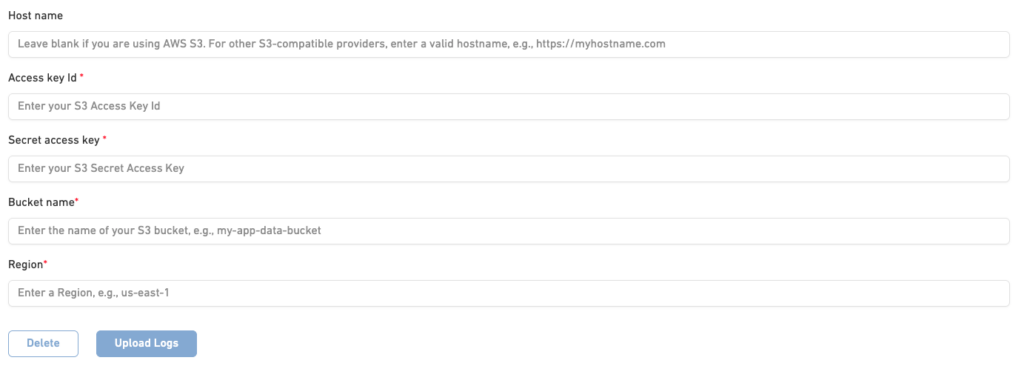
Then click the “Upload Logs” button to activate the raw logs uploader.
⚠️ Important
To complete the setup, please ensure that our system has the necessary write permissions on your S3 bucket. This is required so we can deliver the raw logs directly to your storage. Without these permissions, log delivery may fail.
The directory structure in your bucket will be logs/<year>/<month>/<day>/<hour>/<log-id>.log.gz
Here are some main fields that you will see in your logs and that will be delivered to your bucket:
| Field | Type | Values Allowed | Example |
|---|---|---|---|
args | String (nullable) | Any query string or – if none | sort=1 |
| browser | String (nullable) | Browser name | Webview |
| bytes_sent | Integer | Any non-negative integer | 163321560 |
| cache_status | String | HIT, MISS | HIT |
| datetime | Integer | Unix timestamp in milliseconds | 1778065260000 |
| device | String (nullable) | Device type or null | Windows |
| distribution_id | String | UUID format | 161d1c24-5b4d-4e65-ac1f-de4968027ca4 |
| http_host | String | domain name | example.somedomain.com |
| http_referer | String (nullable) | URL or - if none | - |
| http_user_agent | String | User agent string | Mozilla/5.0 (Windows NT 10.0; Win64; x64) AppleWebKit/537.36 |
| region | String | AS: Asia, EU: Europe, NA: North America, SA: South America, AU: Australia / New Zealand, AF: Africa | AS |
| country | String | ISO country code | CA |
| remote_addr | String | IPv4 or IPv6 address | 113.22.23.19 |
| request_method | String | GET, POST, PUT, DELETE, HEAD, OPTIONS, PATCH | GET |
| scheme | String | http, https | https |
| server_protocol | String | HTTP/1.0, HTTP/1.1, HTTP/2.0, HTTP/3.0 | HTTP/2.0 |
| status | Integer | HTTP status codes (100–599) | 200 |
| uri | String | Request path | /example/path |