Disclaimer:
- Leaseweb VPC is currently in first release phase.
- Customer portal self-service features and automated provisioning capabilities will expand in future updates.
- VPC network management, including creating new networks, assigning IPs or modifying server assignments are currently requested via support ticket.
- Some automation buttons in the Customer Portal are disabled for VPC-assigned servers.
Introduction
Leaseweb VPC, High-Performance Private Networking for the Hybrid Cloud
The Leaseweb VPC is the foundation for the Hybrid Cloud, engineered for businesses that demand the raw power of dedicated hardware with the agility and security of a modern cloud environment.
By bridging the gap between Bare Metal performance, Cloud servers and virtualized networking, the Leaseweb VPC provides a secure, high-capacity foundation for your most critical workloads.
At its core, Leaseweb VPC allows you to build a sophisticated infrastructure where backend traffic is shielded from the public internet, ensuring maximum security and compliance without compromising on speed or reliability.
What is the Leaseweb VPC?
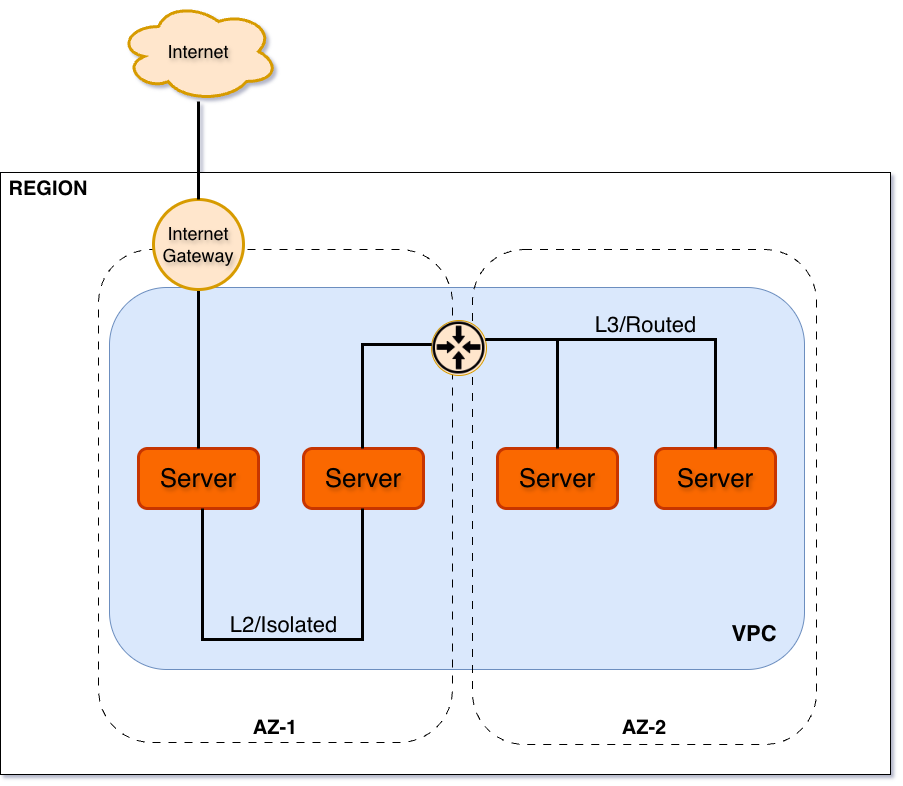
The Leaseweb VPC is a container that consists of 1 or more networks inside the Availability Zones (AZs) of that Region, which means inside the same metro-area or single datacenter when no metro area is available.
You can have 1 or more VPC’s in the same regional AZ’s (metro-area datacenters).
Each network inside the VPC is a separate VLAN:
- L2: Isolated, stand-alone network without a gateway. Services (like Dedicated Servers, Public Cloud instances etc.) can connect to this network and have a secure, unmetered ‘direct’ connection between them.
- L3: Routed network, with a gateway that allows the network to be reached from other networks inside the same VPC. Similar to the L2 network, services can be connected to this network.
- Network ACL: controls the routing between networks (available in a future releases)
- Routing between VPC’s (with a Private Routing Zones)
- Security Groups control the access to the VPC and its networks (available in a future releases)
Product features
Public IP offerings
Local AZ subnet
- A dedicated public IPv4/IPv6 subnet, usable within the AZ.
- Minimum subnet size is /31 (2x IP’s, 1x available, 1x Gateway),
- Allows for IP Portability between equipments inside the AZ, customer can choose which IP to use on which device.
Use case: Deployments with the most flexibility and scalability inside the same Availability Zone.
Regional subnet (Add-on option to Local AZ subnet)
- A dedicated public IPv4/IPv6 subnet that stretches over AZ’s in the same Region
- Minimum subnet size is /31 (2x IP’s, 1x available, 1x Gateway),
- Allows for IP Portability between equipments of the customer, customer can choose which IP to use on which device within the Region.
Use-case: Build High Available solutions over multiple AZ’s in the same Region using the same public IP’s.
VPC Internet Connectivity Bundle
The VPC Internet Connectivity Bundle provides the internet bundle (Datatraffic) to the products inside the VPC.
Internet Data traffic generated or consumed by the resources inside the VPC are charged against the Internet Bundle.
Internet Gateway
The Internet Gateway is used for Direct Attached servers to get a public IP and consume traffic from the Internet Bundle.
Resilient Uplinks
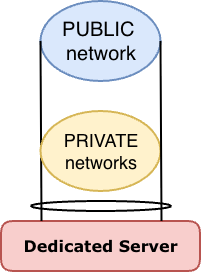
Exclusive to Dedicated Servers in the Leaseweb VPC, each server is provisioned with 2 physical network uplinks for resiliency.
These physical uplinks are grouped together as a single virtual link, attaching to both public and private/internal networks.
Main features:
- Very high bandwidth : It provides a high-speed network that can push up to a combined 200Gbps of bandwidth (depending uplink port capacity)
- Enabled by default : This feature is provided as standard for all Leaseweb VPC Dedicated Servers.
- Improved resiliency and availability : Any potential service interruptions that can lead to the loss of network connectivity can be avoided.
- Bonding : LACP bond, mode 4 (802.3ad, active-active)
- Multiple networks : trunk (802.1q) interface, untagged public vlan, tagged internal vlans
| Uplink speed provided | |||
|---|---|---|---|
| Network linkspeed | 2x 10 Gbps | 2x 25 Gbps | 2x 100 Gbps |
| Maximum bandwidth | 20 Gbps | 50 Gbps | 200 Gbps |
| Guaranteed bandwidth | 10 Gbps | 25 Gbps | 100 Gbps |
Private/Internal Network types
The following 2 network types are defined for Internal/Private segments, which is applicable on a Region level and restricted/confined within a VPC.
- Isolated (Layer-2) Networks:
Fully isolated segments (VLANs) for networks inside the Availability Zone.
This is a strict definition of Layer-2, no additional services that require layer-3 (routing) are provided in this type of network (no DHCP for example).- ‘unlimited’ number of private fully isolated segments (VLANs)
- recommended to keep the number of VLANs below 50 to keep things manageable.
- Routed (Layer-3) Networks:
routed internal networks (VLANs), inside and between Availability Zones, featuring:- built-in DHCP functionality for automated IP management.
- up to 5 routed networks (VLANs),
- built-in DHCP functionality for automated IP management per routed network.
- no filtering (ACL) between routed networks.