Depending on the server’s chassis capacity, you can request an upgrade of your server’s RAM and HDD.
If you are considering a different CPU, we can deploy the new server and run it simultaneously with your existing server so that you can transfer your data. On completion, you can cancel the old server.
Upgrading your Dedicated Server
You can easily request hardware modification from the Leaseweb Customer Portal.
Information
You will be charged a one-time setup fee for the upgrade. Once you request an upgrade, it’ll be performed on the date and time you have selected.
Perform the following steps to request a hardware modification for your server:
Upgrading RAM
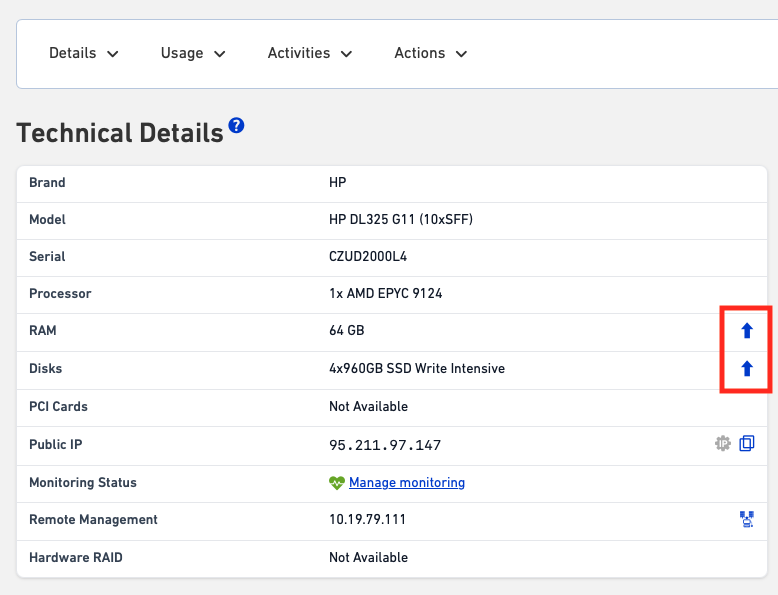
- In the Details page of a Dedicated Server, click on the Hardware Upgrade button next to RAM
- Select the total amount of RAM you want to have on your server. On the right side, the new monthly fee is displayed.
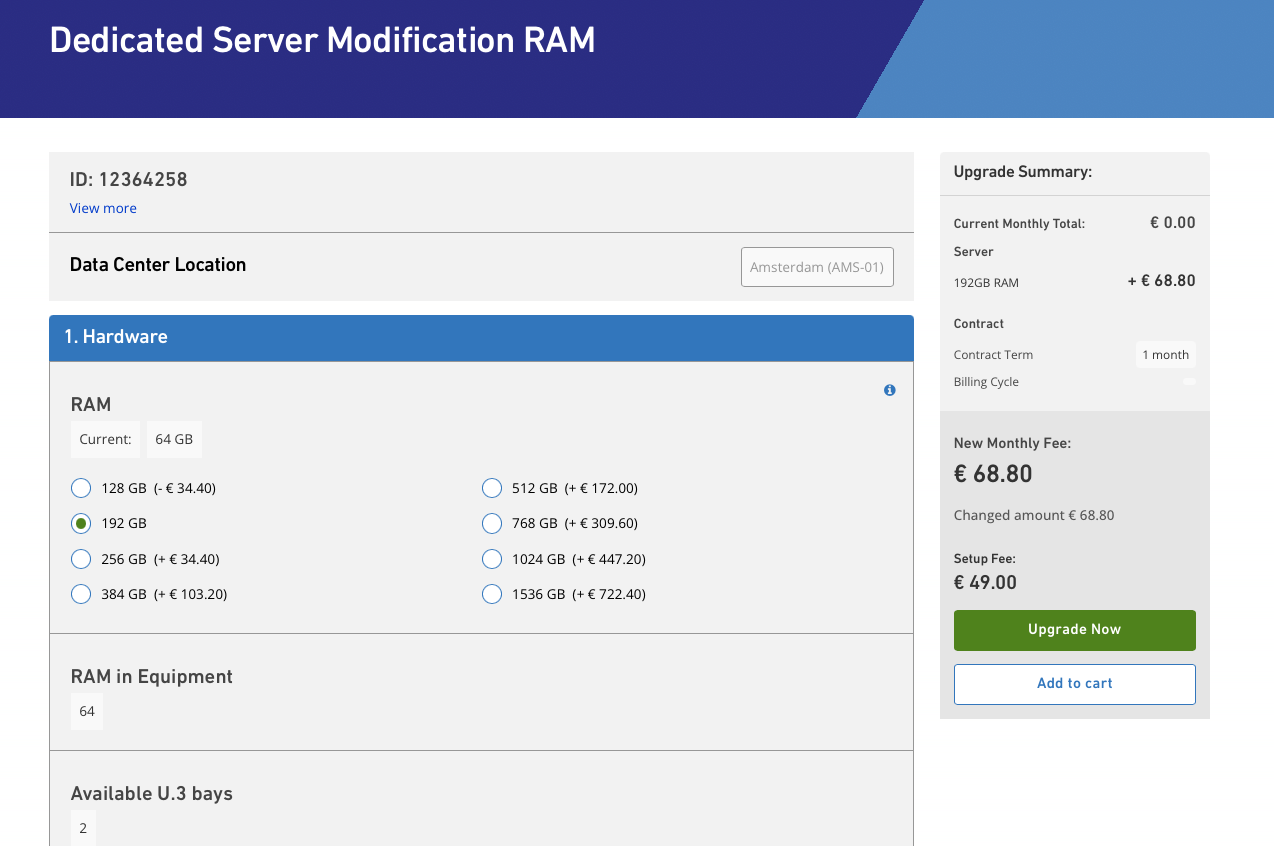
- Click on Upgrade Now. It takes you to the Order Request page.
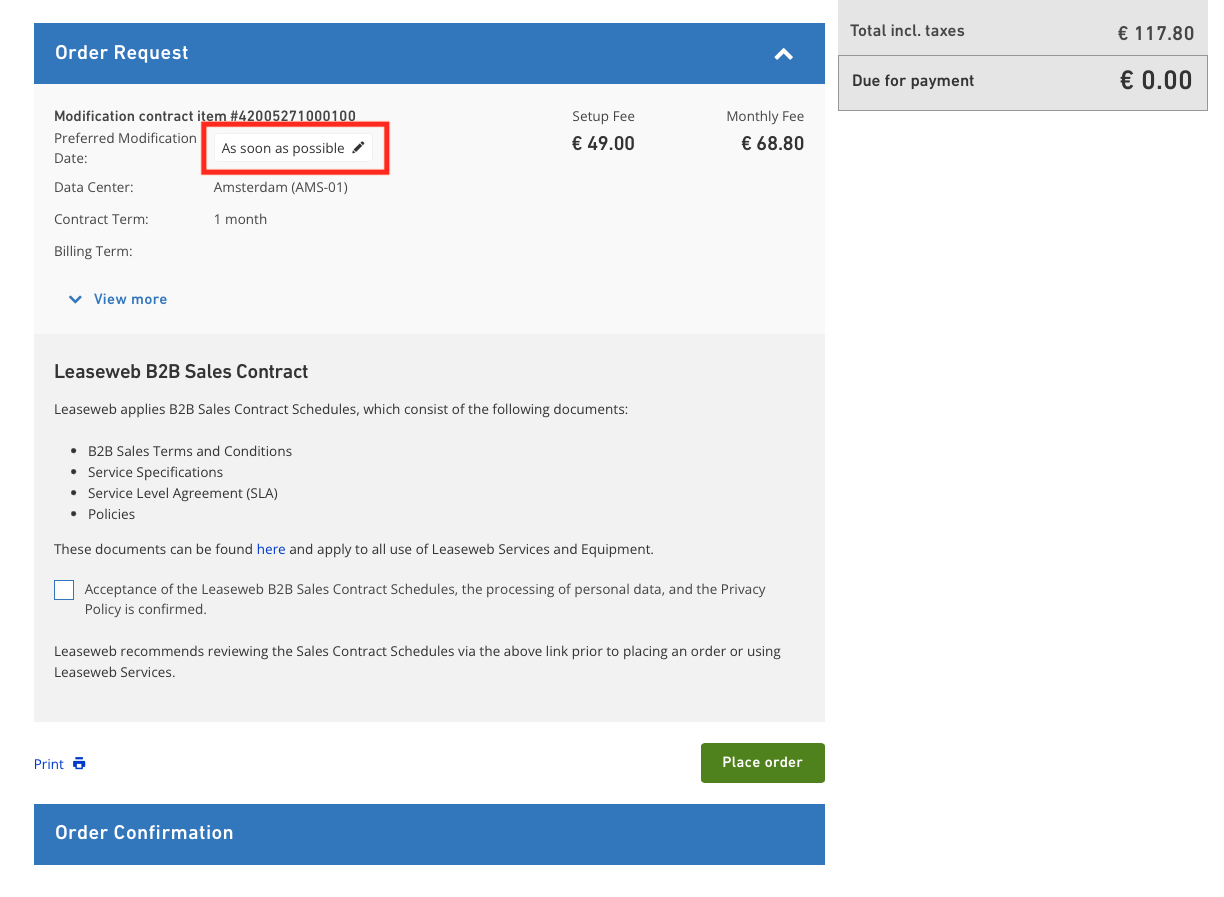
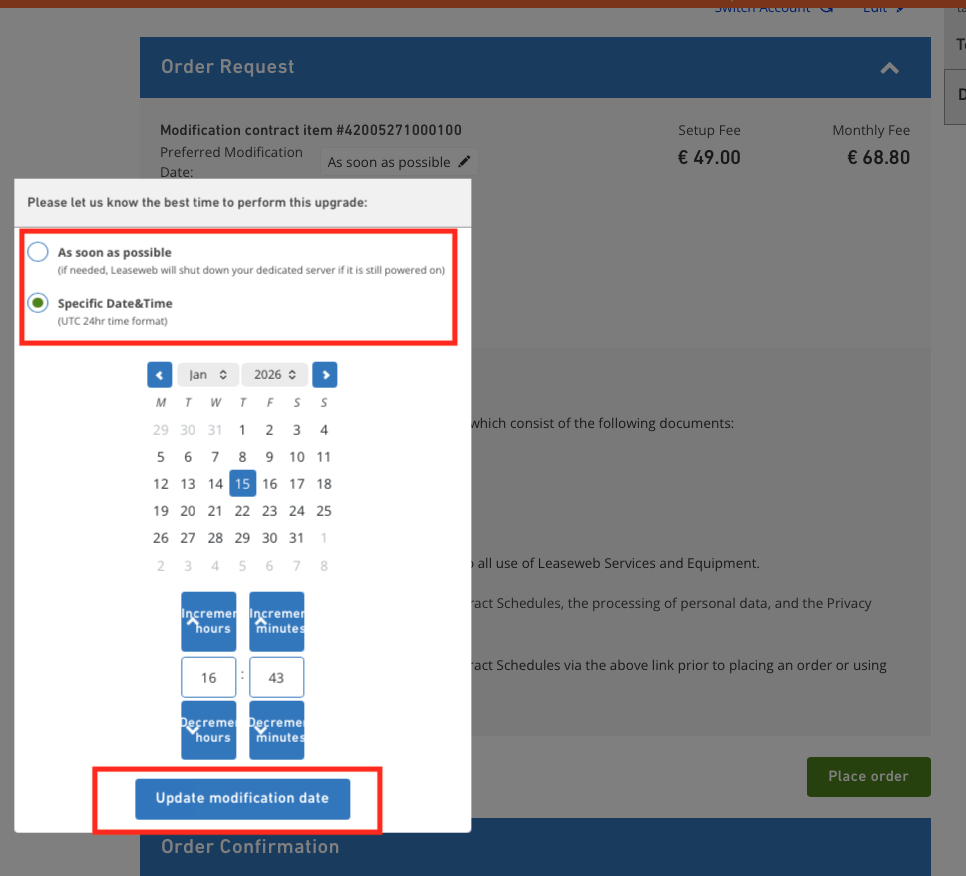
- Here, the preferred modification date and time can be chosen. You can select “as soon as possible” or a specific date and time. Once you have selected an option, click on “Update modification date”.
 Important:
- To perform the upgrade, if your server does not support hotswap, we may have to shut down your server.
- Please keep in mind that the time you select needs to be at least 3 hours from now. This will give us the time to plan and execute the update.
- If you select “as soon as possible”, the upgrade will be performed within 24 hours.
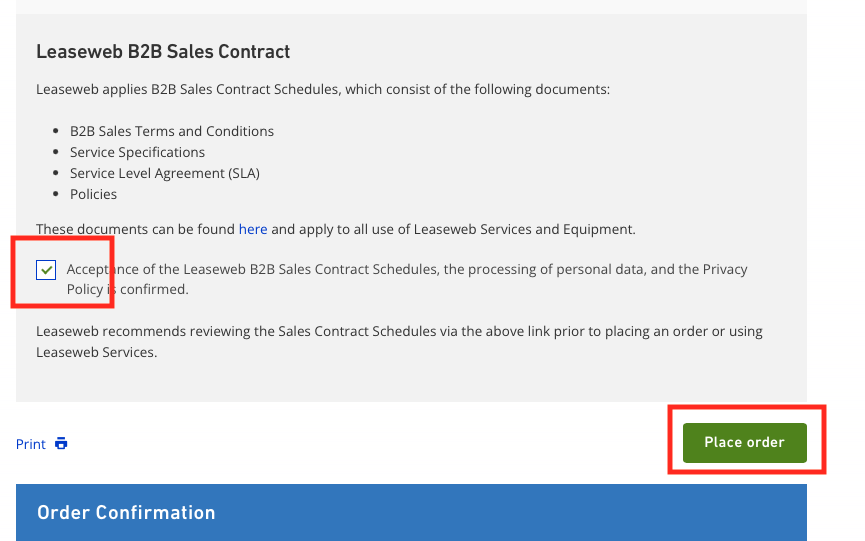
- Lastly, agree to the terms and conditions and click on “Place order”
Upgrading disks
- In the Details page of a Dedicated Server, click on the Hardware Upgrade button next to disks.
- You will be redirected to the disk modification page. Here you can choose either from the predefined disk sets or configure disk sets according to your needs.
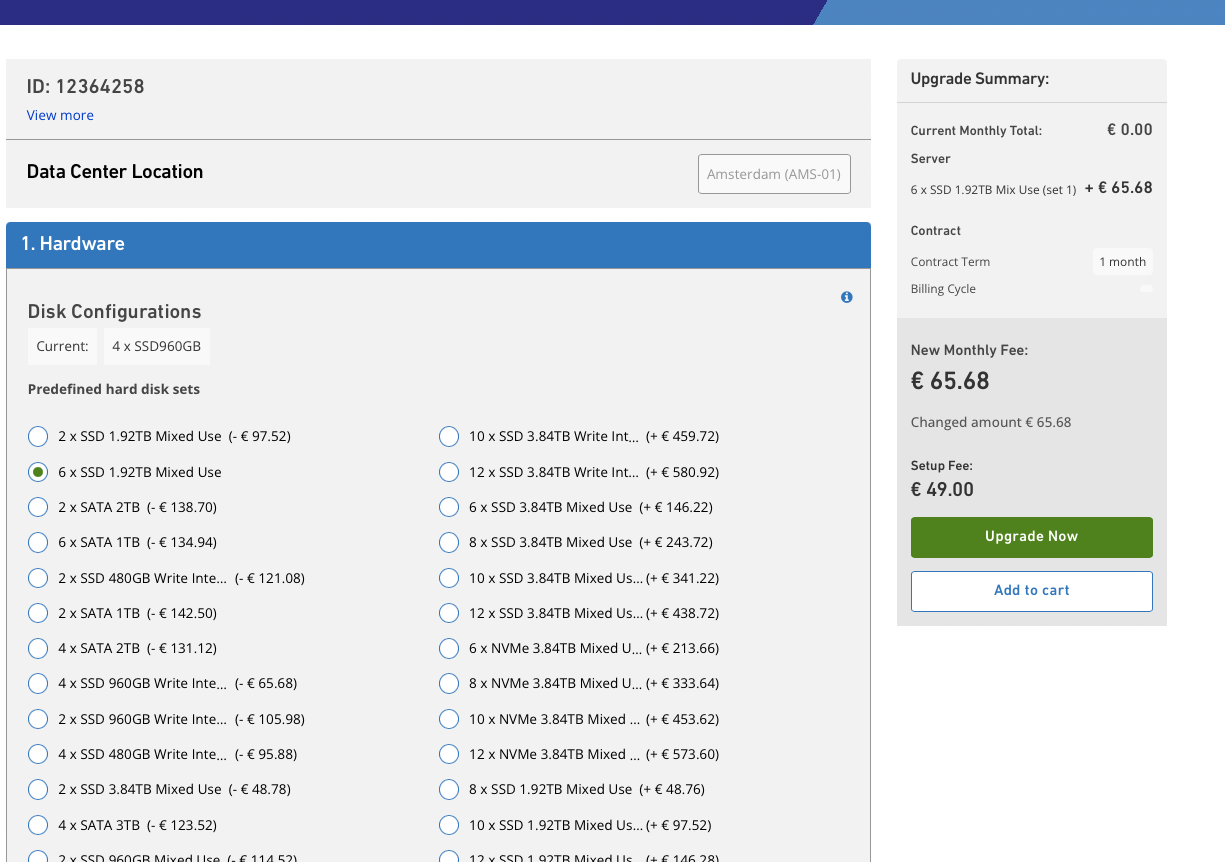
- For configuring disk sets, click on “Configure hard disk sets”
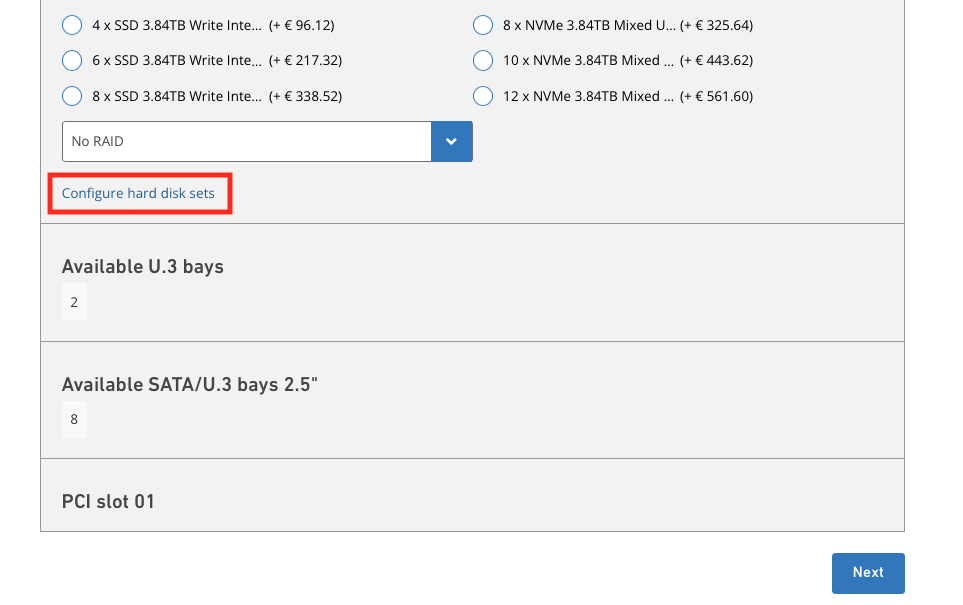
- Here you can select the required disk sets and the RAID configurations. The price will be shown on the right side.
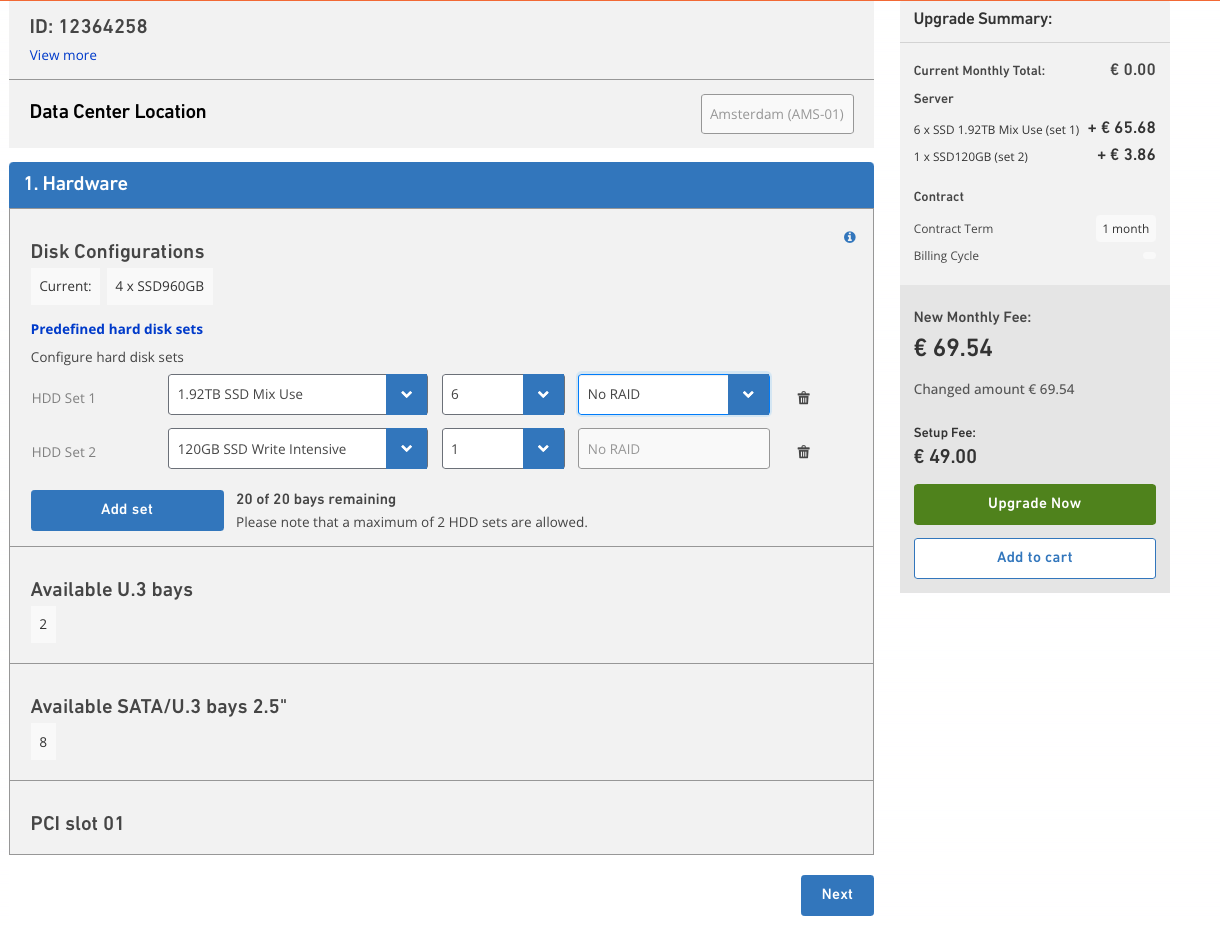
- Click on Upgrade Now. It takes you to the Order Request page.
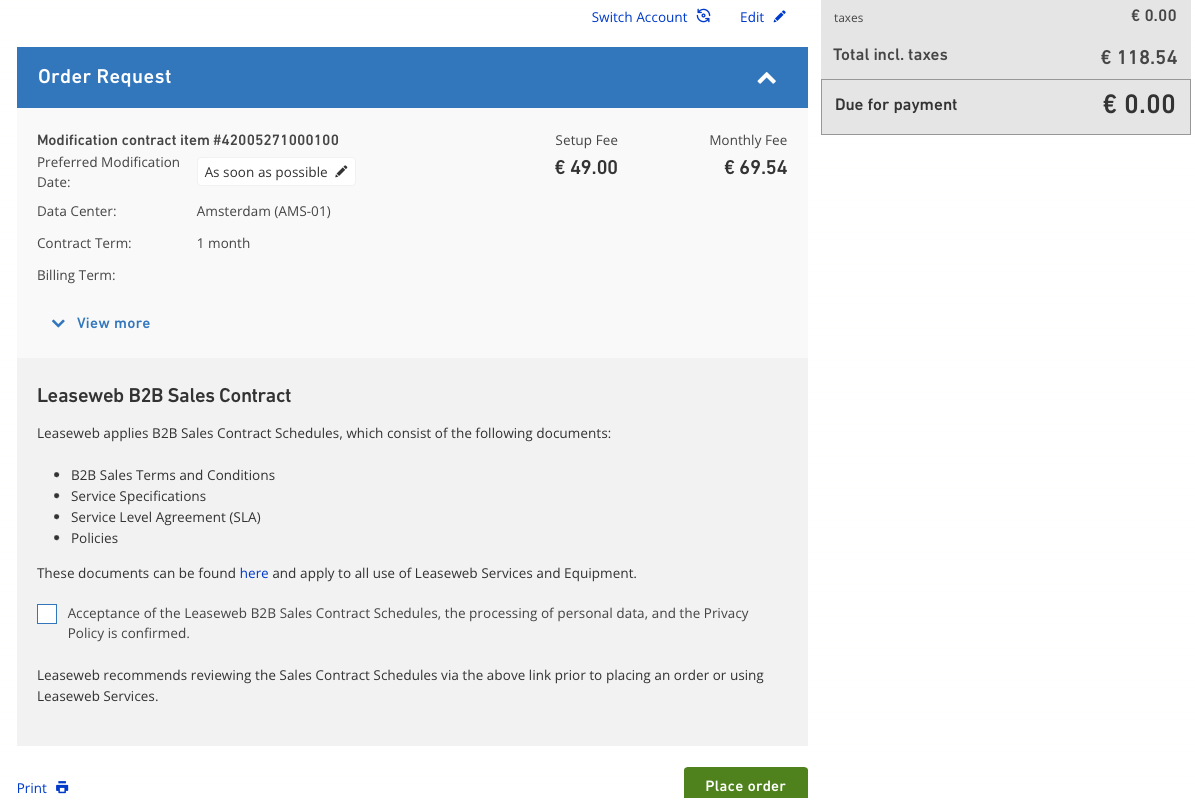
- Here, the preferred modification date and time can be chosen. You can select “as soon as possible” or a specific date and time. Once you have selected an option, click on “Update modification date”.
- Important:
- To perform the upgrade, if your server does not support hotswap, we may have to shut down your server.
- Please keep in mind that the time you select needs to be at least 3 hours from now. This will give us the time to plan and execute the update.
- If you select “as soon as possible”, the upgrade will be performed within 24 hours.
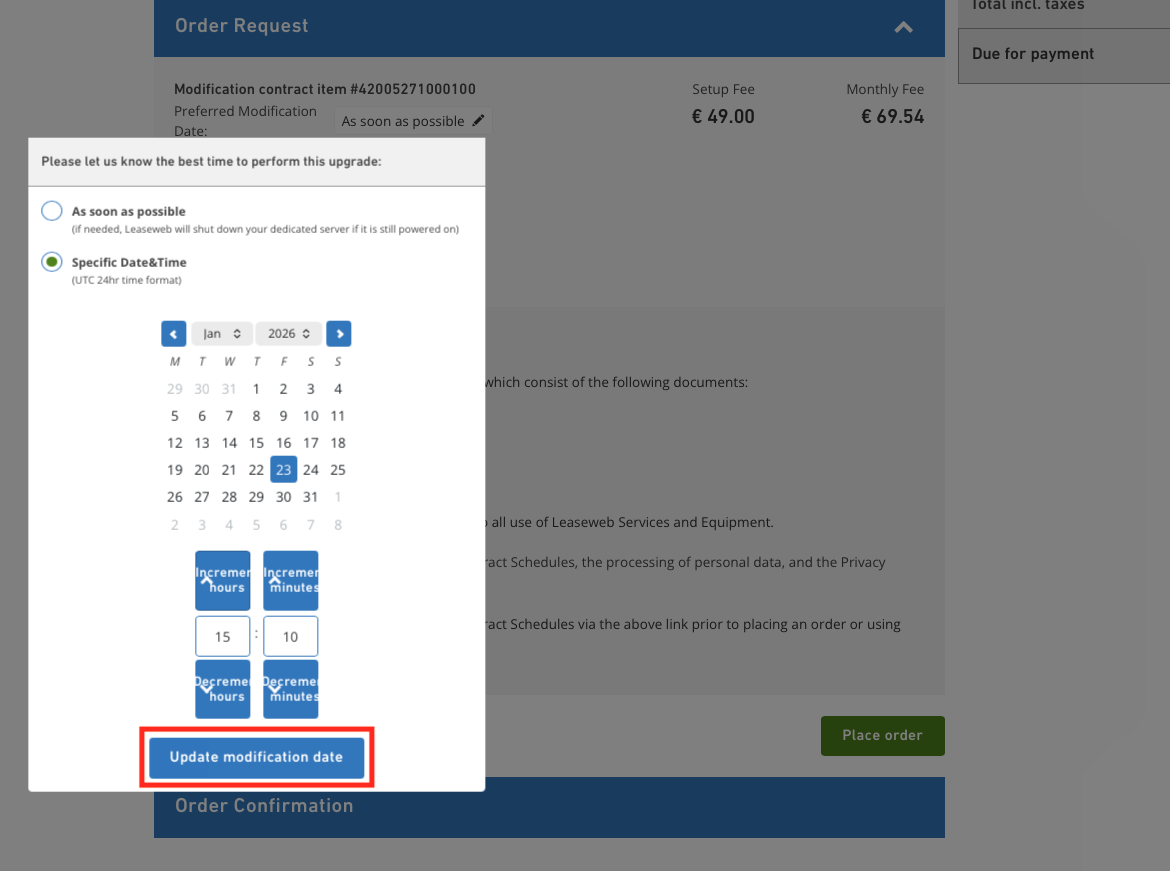
- Lastly, agree to the terms and conditions and click on “Place order”.
Tip
We recommend that you check the server’s compatibility matrix with the disks you want to upgrade to.
Warning
If you want to shut down the server by yourself, please do so before the preferred time you have selected. If the server is not shut down, Leaseweb will shut it down to perform the upgrade.
Information
In the case of a Contract Modification Order relating to a Sales Contract that has a Contract Term of one (1) month, the Sales Contract Term shall be automatically extended by one (1) renewal month.
Compatibility matrix for hardware modification
Before requesting a hardware upgrade, we recommend that you check if the upgrade request is compatible with your server and if downtime is required when performing the upgrade.
Information
Downtime
To perform an upgrade, a downtime is sometimes required, depending on the type of server, the OS and RAID configuration. Some of the checks are:
- If hot-swappable drive bays are present on the server
- Disk is a member of OS/RAID
No downtime is required when the server supports hot swap. Hot swap means that a disk can be replaced without turning off the server and without affecting the operation of the OS.
This disk should also not be part of the OS and should not be a part of a crucial RAID configuration which does not support disk drive failure tolerance.
Downtime is required when the server does not support hot swap. In this case, the server needs to be turned off, and the chassis needs to be opened in order to remove and replace/upgrade a disk.
Exception: When a server supports hot swap, but the faulty disk is part of the OS and/or RAID configuration/array that has no disk failure tolerance. This means that the disk cannot be replaced without downtime.
Compatibility information in the Customer Portal
For most server models, the number of drive bays is also shown directly in the Customer Portal under Server Details > Technical Details as part of the model itself:

In case this information is different from the table below, the information shown in the Customer Portal is leading.
Note: LFF bays (large form factor) support both 3.5″ and 2,5″ disk form factors. SFF (small form factor) supports 2.5″ only.
The number of memory banks is visible under Hardware Details > Memory Banks.
HP servers
Information
HP generations
The HP models are categorised based on generations. These generations are marked by a G followed by the generation number. For example: G6, G7 or G9
| Model | #rack units | Max memory | Max hard drives | Max disk size | Supports SSDs | Hot-swap hard disk drive bays | Total onboard network ports | Supported network speed | PCI Slots | RAID controller | Height |
|---|---|---|---|---|---|---|---|---|---|---|---|
| HP DL20 G9 | 1U | 64GB | 2 disks | – | YES | YES | 2 ports | 1Gb/s | 2 slots | NO | 1U |
| HP DL20 G10 | 1U | 64GB | 2 disks | – | YES | YES | 2 ports | 1Gb/s | 2 slots | NO | 1U |
| HP DL120 G6 | 1U | 32GB | 4 disks | Up to 4 Terabyte | YES | YES | 2 ports | 1Gb/s | 2 slots | NO | 1U |
| HP DL120 G7 | 1U | 32GB | 4 disks | Up to 6 Terabyte | YES | YES | 2 ports | 1Gb/s | 2 slots | NO | 1U |
| HP DL120 G9 | 1U | 256GB | 4 disks | – | YES | YES | 2 ports | 1Gb/s | 3 slots | NO | 1U |
| HP DL180 G6 | 2U | 192GB | 12 disks | – | YES | YES | 2 ports | 1Gb/s | 1 slot | YES | 2U |
| HP DL180 G9 | 2U | 192GB | 12 disks | – | YES | YES | 2 ports | 1Gb/s | 1 slot | YES | 2U |
| HP RL300 G11 | 1U | 1024 GB | 8 SFF NVMe | – | YES | YES | 2 ports | 2x10Gb/s | 2 slots | NO | 1U |
| HP DL325 G10 / G10+ | 1U | 512GB | 4 disks | – | YES | YES | 4 ports | 1Gb/s | 3 slots | NO | 2U |
| HP DL360 G10 | 1U | 768GB | 8 SFF | – | YES | YES | 4 ports | 1Gb/s | 3 slots | YES | 1U |
| HP DL380p G8 | 2U | 768GB | 12 disks | – | YES | YES | 4 ports | 1Gb/s | Up to 6 slots | YES | 2U |
| HP DL380e G8 | 2U | 384GB | 12 disks | – | YES | YES | 4 ports | 1Gb/s | Up to 6 slots | YES | 2U |
| HP DL380 G10 | 2U | 768GB | 12 disks | – | YES | YES | 4 ports | 2x1Gb/s, 2x10Gb/s | 3 slots | YES | 2U |
| HP DL385 G10 / G10+ | 2U | 1TB | 12 disks | – | YES | YES | 4 ports | 1Gb/s | 3 slots | YES | 2U |
Dell servers
| Model | #rack units | Max memory | Max hard drives | Max disk size | Supports SSDs | Hot-swap hard disk drive bays | Total onboard network ports | Supported network speed | PCI Slots | RAID controller | Height |
|---|---|---|---|---|---|---|---|---|---|---|---|
| Dell R210 | 1U | 32GB | 2 disks | – | YES | NO | 2 ports | 1Gb/s | 1 slot | NO | 1U |
| Dell R230 | 1U | 64GB | 4 disks | – | YES | YES | 2 ports | 1Gb/s | 1 slot | NO | 1U |
| Dell R240 | 1U | 64GB | 4 disks | – | YES | YES | 2 ports | 1Gb/s | 2 slots | NO | 1U |
| Dell R510 | 2U | 128GB | 12 disks | – | YES | YES | 4 ports | 1Gb/s | 3 slots | YES | 2U |
| Dell R620 | 1U | 768GB | 8 disks (SFF) | – | YES | YES | 4 ports | 1Gb/s | 1 slot | YES | 2U |
| Dell R630 | 1U | 768GB | 8 disks (SFF) | – | YES | YES | 4 ports | 1Gb/s | 1 slot | YES | 2U |
| Dell R640 | 1U | 768GB | 10 disks (SFF) | – | YES | YES | 4 ports | 2x1Gb/s, 2x10Gb/s | 3 slots | YES | 2U |
| Dell R6515 | 1U | 1024 GB | 8xSFF/ NVME+2NVMe | – | YES | YES | 4 ports | 2x1Gb/s, 2x10Gb/s | 2 slots | NO | 1U |
| Dell R710 | 2U | 288GB | 6 disks | – | YES | YES | 4 ports | 1Gb/s | 4 slots | YES | 2U |
| Dell R720XD | 2U | 768GB | 12 disks | – | YES | YES | 4 ports | 1Gb/s | 4 slots | YES | 2U |
| Dell R730XD | 2U | 768GB | 12 disks | – | YES | YES | 4 ports | 1Gb/s | 4 slots | YES | 2U |
| Dell R740XD | 2U | 768GB | 12 disks | – | YES | YES | 4 ports | 2x1Gb/s, 2x10Gb/s | 4 slots | YES | 2U |
| Dell R7425 | 2U | 2048GB | 12xLFF | – | YES | YES | 4 ports | 4x1Gb/s or 2x1Gb/s, 2x10Gb/s | 3 slots | YES | 2U |
| Dell R750 | 2U | 2048GB | 16SFF+8NVMe | – | YES | YES | 4 ports | 2x1Gb/s, 2x10Gb/s | 6 slots | YES | 2U |
| Dell R7525 | 2U | 4096GB | 16SFF+8NVMe | – | YES | YES | 4 ports | 2x1Gb/s, 2x10Gb/s | 5 slots | YES | 2U |
| Dell R920 | 4U | 1536GB | 24xSFF | – | YES | YES | 2 ports | 2x1Gb/s | 3 slots | YES | 4U |
| Dell R930 | 4U | 3072GB | 24xSFF | – | YES | YES | 4 ports | 4x1Gb/s | 3 slots | YES | 4U |
| Dell R940 | 3U | 1536GB | 24xSFF | – | YES | YES | 4 ports | 2x1Gb/s, 2x10Gb/s | 7 slots | YES | 3U |
IBM servers
| Model | #rack units | Max memory | Max hard drives | Max disk size | Supports SSDs | Hot-swap hard disk drive bays | Total onboard network ports | Supported network speed | PCI Slots | RAID controller | Height |
|---|---|---|---|---|---|---|---|---|---|---|---|
| IBM X3630 M3 | 2U | 192GB | 12 disks | – | YES | YES | 2 ports | 1Gb/s | 3 slots | YES | 2U |
| IBM X3650 M4 | 2U | 768GB | 6 disks | – | YES | YES | 4 ports | 1Gb/s | 3 slots | YES | 2U |
Supermicro servers
| Model | #rack units | Max memory | Max hard drives | Max disk size | Supports SSDs | Hot-swap hard disk drive bays | Total onboard network ports | Supported network speed | PCI Slots | RAID controller | Height |
|---|---|---|---|---|---|---|---|---|---|---|---|
| SSG-6048R-E1CR24H | 4U | 512GB | 26 disks | – | YES | YES (24) | 2 ports | 10Gb/s | YES | 4U | |
| SSG-6049P-E1CR24H | 4U | 512GB | 26 disks | – | YES | YES (24) | 1 ports | 10Gb/s | YES | 4U |
Huawei servers
| Model | #rack units | Max memory | Max hard drives | Max disk size | Supports SSDs | Hot-swap hard disk drive bays | Total onboard network ports | Supported network speed | PCI Slots | RAID controller | Height |
|---|---|---|---|---|---|---|---|---|---|---|---|
| RH2288V3 | 2U | 512GB | 12 disks | – | YES | YES | 4 ports | 1Gb/s | YES | 2U | |
| RH2288HV3 | 2U | 768GB | 12 disks | – | YES | YES | 4 ports | 1Gb/s | YES | 2U |