What Are Labels for Kubernetes Node Pools?
In Kubernetes, labels are key–value pairs that you can attach to cluster resources to describe and categorise them. When applied to node pools, labels offer a straightforward and adaptable method for categorising groups of nodes based on their characteristics or intended purpose. These labels are propagated to the individual worker nodes, allowing workloads and cluster components to make scheduling or operational decisions based on them.
Label Prefix
All labels defined on a node pool are automatically prefixed by the platform to avoid conflicts with system and Kubernetes-reserved labels.
Prefix applied to all node pool labels:
label.leseweb.io/
For example, a label defined as:
environment:productionWill appear on worker nodes as:
label.leaseweb.io/environment=productionThe prefix is applied automatically and cannot be changed.
Setting Labels
You can assign labels to a node pool when creating or updating it.
- To set labels, navigate to your cluster -> go to the Node Pools tab
- Click Edit on the node pool you want to label
- In the Labels section, enter your key–value pairs
- Click Update -> Confirm to apply the changes.
Information
Labels should be in the format key:value, and each key must be unique within a node pool.
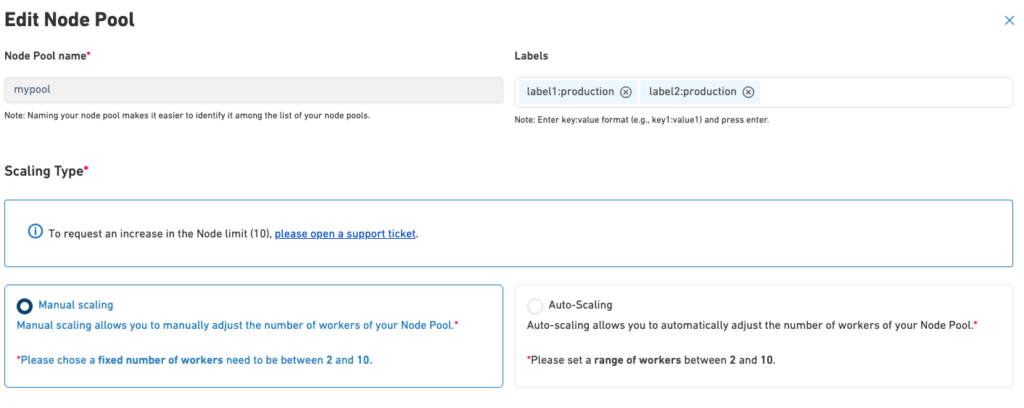
To view the labels for a node pool, you can expand the node pool details.

Updating or Deleting Labels
You can modify or remove labels at any time using the node pool Edit option
- Go to the Node Pools tab -> select Edit for the desired node pool
- In the Labels section, add new labels, modify existing ones, or remove labels as needed
- Click Update -> Confirm to apply the changes.
Viewing Labels on a Node Using kubectl
You can view the labels applied to a specific worker node using kubectl.
Run the following command, replacing <node-name> with the name of the worker node:
kubectl get node <node-name> -o yamlThe command returns the full node definition. Labels applied through the node pool are visible under the metadata.labels section.
Example
metadata:
  labels:
    kubernetes.io/arch: amd64
    kubernetes.io/os: linux
    label.leaseweb.io/environment: staging
    label.leaseweb.io/labels: "true"
    node-role.kubernetes.io/worker: ""
In this example:
label.leaseweb.io/environment: stagingwas defined on the node pool- The label is automatically prefixed and propagated to the worker node
- All node pool labels appear alongside standard Kubernetes labels
Labels Lifecycle
Labels defined on a node pool follow a consistent lifecycle.
- New worker nodes (for example, through autoscaling) automatically receive the labels
- When a label is updated on the node pool, the change is propagated to all corresponding worker nodes
- When a label is removed from the node pool, it is automatically removed from the worker nodes
- Manual modification of node pool labels directly on individual nodes is not supported, as labels are reconciled from the node pool configuration
- When a label is removed from the node pool, it is automatically cleaned from the worker nodes